Showing posts with label TSM. Show all posts

Tuesday, 24 September 2013

What's Been Selling This Week? 23rd Sept Edition


Well it felt like it was a good week on the Auction House but I have been a bit distracted by Hearthstone & a few other projects too. It was only yesterday evening when I went to take a screenshot of the My Sales summary that I realised that after the mini-patch last maintenance day, I hadn't enabled out of date addons & none of my sales for the week have been recorded! I feel like I've been asleep most of the week or at least zoned out so I doubt my figures would have been that good anyway!

However, I can say that I haven't sold as many gems as the previous week or any of the new glyphs as I didn't craft any new ones & I've even let my daily Cooldowns slip a bit too. I have been selling some of the new Crafted PvP pieces though - not for the 1000g they were in the first week after patch but I have kept the price up to around 700g. That sounds great but actually, that's what I was selling the previous PvP gear for soit's not really that good as material costs are much greater this time.

Having said that, Exotic Leather is super cheap now - I'm so glad I didn't raise my buy price before the patch - I was a little worried that I wouldn't have enough Leather but not having played the PTR, I hadn't picked up on the Skinners Paradise that is the Timeless Isle! I even managed to grab a few stacks of Exotic leather at 10-15g per stack!

Mysterious Fortune Cards are still selling well - my super cheap competitor must be busy over on the Isle or raiding or something because I've had almost no competition again this week. I'm not complaining - I still have over 1000 in stock so I'll be selling these until the next expansion I reckon!

As for the Isle? Well, I took my Paladin over first and got a whole load of 496 purples - sent some to my DK & then took her over too. Wow! What a difference between the two - my Pally can barely manage to stay alive, even though she has a much higher item level. My DK is blood spec though so although she stays alive pretty well, she takes forever to kill anything!

My paladin is my skinner too so I keep kept getting distracted by all that lovely leather just laying around! I'm not sure which alt I'll take over there next or quite what to do once I'm there to be honest. I quickly got bored of chest hunting & rare chasing isn't really much fun when you die in the first 30 seconds or so! lol

I made sure to turn my add-ons back on so hopefully normal reporting will resume next week. I did find this cool graph bit in TSM but I haven't got my head around the Accounting reporting function yet. You can clearly see when the Patch 5.4 activity started though & you can also see the flatline near the top where I didn't even log in for a day or two! Oops!


****************

Check out some of my Squidoo lenses!


Image © Tambako The Jaguar under Creative Commons licence

Friday, 26 July 2013

How Not To Lose Gold With Lazyness!


Today I earned a valuable reminder to not wear blinkers when making gold. I have my Trade Skill Master all set up & as I'm usually some kind of zombie when auction housing these days, I usually just empty my mailbox, hit the button to list my auctions & let TSM do it's thing. But today I almost missed a small problem that could have lost me gold!

One of my regular markets is Mysterious Fortune Cards - not the biggest market & not the most lucrative in terms of overall earning power but it is an easy one & brings in a few thousand gold quite regularly for me. I use the TSM Destroying search to find the herbs I need to make Blackfallow Ink (or Ink of Dreams to convert at the Ink Seller) and I have the 'regular' stack size box ticked as it has been for ages & ages now.

I've been having trouble lately finding enough cheap herbs to make the Cards though, so today, I did my search as usual and bought just the cheapest few stacks. The art of profiting from Mysterious Fortune Cards is to keep those ink costs down of course so when ink costs are up at 9g or more, it's really not worth the time & effort to make cards to sell at 15gold. I have tried creeping the price up but 15 gold is the sweet price point for my server.

So yeah, 6 paltry stacks of cheap herbs was all I managed to find today so that was a little disappointing. Off I went to search through my usual shopping lists and up popped Stormvine at 1gold each! That's strange though because they didn't show up in the Destroying search I'd run a few minutes earlier. Back I went & re-ran the Destroying search, thinking they'd just been listed perhaps. Nope, still didn't show up but then I noticed the check mark in that little 'regular stacks' box - unticked that & hey presto! lots of odd bits of cheap herbs popped up.

Okay, so I'm going to end up with a lot of partial stacks but as my DK/Scribe isn't making glyphs anymore or actually doing anything useful, filling her bags with bits of herb stacks isn't so bad, especially if I can keep getting so many cheap herbs!

So the moral of the story today is don't get blinkered or complacent when auction housing - check your settings regularly!


****************

Check out some of my Squidoo lenses!

Image © Alice_Henneman under Creative Commons licence

Wednesday, 19 December 2012

Selling Level 83-85 Green MoP Armor to Cataclysm Levelers


I've been kind of slacking lately with my professions. I finally got my Blacksmith maxed late last week & over the weekend, I decided it was time to sort out my Enchanter's mailbox & bags. Almost every green armor drop I've picked up whilst leveling 3 alts through Pandaria has been mailed to her so after sorting out all the non-MoP stuff, I tackled the green armour.

Where to start was my first thought! I had item level 364's, 377's, 384's, 390's & some 400+'s too & no idea which of them were disenchant fodder & which were saleable. My first stop was Cold's excellent post about stat weight priorities by armor type & which ones to try to sell. It has some great information but I wanted a quick & easy fix for bulging bags & I just wasn't in the frame of mind to tackle such a detailed sorting out. I've bookmarked it for future reference though & will be streamlining my Trade Skill Master auctioning groups based on his post.

Green Armor ilvl 364
Green Armor ilvl 377
Green Armor ilvl 384-390
For now, I initially created a TSM auctioning group for each item level & popped in some basic amounts for my Threshold & Fallbacks. I then went to the auction house as if I was going to post them - just to see what the prices were like for each group & whether a broad brush approach would work. One thing became obvious quite quickly - the item level 400+'s weren't selling for very much at all. This was my gut instinct anyway as I've found so much gear from drops & quest rewards that I've not needed to buy anything from the Auction House.

The screenshots above show which items I currently have in which groups. As I pick up new stuff, I'll just add them to the auctioning group & forget about them! The item level 364's are for level 83 alts, the item level 377's are for level 84's & the item level 384 & 390's are for level 85's. Now these were quite nicely priced - definitely way above any disenchanting value so I kept these armor pieces & disenchanted any of the others in my bags.

Off I went back to the Auction House & ran my usual post cycle, including these armor items. I've set the 364's at 199g, the 377's at 225g & the 384/390's at 249g for now - just to test the market. I've also set them only to list for 24 hours to keep the deposit price down. When I came back the next day, I have to say I was pleasantly surprised - 9 pieces had sold overnight for a princely sum of  just over 2000 gold!

MySales screenshot of Sales for Green Armor
Now I know that's not such a huge amount but bear in mind that this stuff was destined to be disenchanted so actually, I'm glad I spent a bit of time sorting through it all. I've also put gear to one side for my 3 remaining alts who have yet to start their leveling. All three of them weren't very geared by the end of Cataclysm & are my weakest alts too so having a whole bunch of upgrades to start Jade Forest with should make my life a bit easier when the time comes!

Over time I may very well end up buying green armor in these categories if they are priced very cheaply. This is a definite possible replacement market (or addition, depending on your server) for the level 77-80 green armor sales which on my server at least, seem to have almost disappeared completely for now.

I also leveled my enchanting a bit & although I only made the very cheapest enchants to do so, I have been quite pleased with those sales too but that's a story for another post! Have you had much luck in this armor market? How is the level 77-80 Cata greens market doing on your server? Would love to hear your thoughts so you know the score - leave a comment below or maybe tweet me @nevahaddict.


****************

Check out some of my Squidoo lenses! Gift Guide - Horde Edition | Gift Guide - Alliance Edition


image © dicktay2000 under Creative Commons licence

Friday, 11 March 2011

TSM - Part Two - Crafting & Posting Glyphs

So here we go - part 2 & I hope this doesn't get confusing! I'll try & run through it in the order that I run as part of my routine so it will involve a little jumping around :)

First off, go to the Auction House & open your usual browse window. In the top right hand corner, you'll see a new box marked TSM - this is your open/close button for the pop out menu, shown below. Button 1 is your Post, button 2 is your Cancel, button 3 is the Scan menu, button 4 is the milling/prspecting shopping button & button 5 is your Shopping - crafting mats. The ones I haven't labelled are ones I don't generally use & certainly not for part of my glyph process so I've left them out for now.


I numbered the buttons from top to bottom but actually the first one I use is Button 3! This is the scan button which brings up its' own sub menu, shown below. If you have more than one profession set up for use with TSM you can click as many or as few of these categories as you like. I tend to scan just for the craft I'm working on as it's quicker & then my data is current for the relevant craft. Scanning for inscription only will look at all herbs, pigments, inks & glyphs, as well as any of the other miscellaneous items used for relics, tomes & decks. I'm guessing but this scan takes maybe 1-2 minutes at the most.


Before I go any further, I touched on this in yesterday's post - I preset my ink prices so that each ink/glyph group can have it's own threshold. In the window below, you can see I have Midnight & Lion's Ink preset at 5g per ink - this means that my threshold for these glyphs can be as low as 17g (3xink + parchment + AH 5%). This price shows up later in the process when shopping so I always know how much my maximum ink price is for any given set of glyphs.

To set these prices, go to the main TSM window (from your minimap icon), press the inscription button on the left hand side then choose Materials from the list. You have to put a tick in the Override box then enter your maximum ink price & hit 'okay'. Done! This is a preset so you only need to change it when your server prices for herbs change or if you find you under/over estimated ink costs.


After scanning, close down the AH window & open up your usual Craft window. At the top left, you will see a button for Open TSM Crafting, which opens this restock window. At the left hand side, you will see your ink categories (which we set up yesterday). If you hit the big 'Restock Queue' button, it will produce a list of glyphs to craft (on the right hand side) and a shopping list at the bottom left. In the last day or so, this module has been updated to included Inks & pigments in your shopping list so that makes life a lot easier!

The one thing I haven't quite worked out is why it didn't add in Glyph of Flame Shock & Glyph of Immolation Trap - it says they meet my profit criteria & I don't have any on other alts or anything either. All I do with these is a quick double check at the AH. Close down Craft window, reopen AH window & browse for these two - if they are still at profit & not too many of them, I add them to the craft queue manually.

To add or remove glyphs manually, you just left or right click the glyph name in the left hand list.


So we now have a list of glyphs required to restock & it's created a shopping list for us - time to go shopping! When I am having a buying/crafting session, I use button 5 the 'Shopping - Crafting mats' button. Open your AH browse window, open the pop out menu. It imports my shopping list to the bottom half of the window & searches the current listings for inks, pigments & herbs - sorted by the cheapest first. Your preset ink price is shown alongside the ink in the bottom window - in this screenshot it says 6g (old screenshot - I've updated since then!!).

Alongside the big BUY button, it shows how many available & price as well as the price per ink - watch this price & click buy for as long as it stays below your preset price. Once the ink price goes above your preset price, you can either make an executive decision to continue buying or you can hit the 'Skip Current Item' button at the very bottom of the window. If there is enough supply to fulfill your shopping list, it will skip to the next ink type once you have enough of this one.


At this stage, it's time to collect your herbs from the mailbox & do the usual milling routine. Then re-open your Inscription window, reopen the TSM page & hit the big 'Craft Next' button. If there weren't enough herbs available at your preset price, you can narrow down the list of glyphs by clicking the 'On Hand Queue' button. I'm not 100% positive but I think the parchments may be a limiting factor here so go get what you need before you shorten the queue!

With the recent change, actually making the ink is now part of this queue so it's time for a quick coffee/smoke break if you have a lot of inks to craft. I sometimes prefer to do this the old fashioned way so that I can process the inks by volume - i.e biggest workload first while I go get coffee then sit through the smaller ink craftings. Unfortunately, you still need to click when the item type changes - good of ToS :(

Once you have clicked your way through all the glyphs in your craft list, it's time to post! Back to the AH browse window, open the TSM pop out menu & hit button 1. It will scan & queue all the glyphs in your bags ready to be posted. If any prices have changed whilst you were crafting, you may end up with a few left in your bags as it won't post any that fall below your threshold (unless you set it to post at fallback, covered yesterday). I had a measly 4 to post when I took this screenie but usually it's upwards of 200 on my main scribe.

You can start clicking the 'Post Auction' button while it's still scanning/queueing but 200 still takes maybe 2 mins max, including my clicking time :) If you click slowly, you will see the details of each post so if you've made an error somewhere or it wants to list something you don't want it to list - just click the 'Skip Item' button at the bottom. Once you gain some confidence in what TSM is doing & that you're happy with your groups/prices etc, you will be able to click like a madman.


It will post at your preset undercut amount or your fallback, depending on your settings. The Cancel process is exactly the same except it's button 2 and it only cancels auctions which have been undercut! This is why I love TSM - 2 minutes to cancel 200 auctions & 2 minutes to repost them all (mailbox is the limiting factor for speed here).
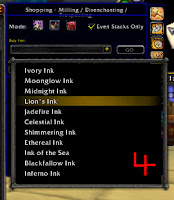
As a last bit of information, I also use button 4 on the AH TSM pop out menu - this is the 'Shopping - Milling/Disenchanting & Prospecting' button. I use this on days in between major glyph craftings to pick up herbs at low prices - a bit like a snatch list I suppose. Click 1 of the 3 buttons at the top (mill/prosp/disench) then pick your ink from the drop down list and hit the 'Go' button. The display is very similar to your shopping list buying page but it doesn't show you your preset ink prices so bear those in mind. If you buy these 'cheap' herbs regularly & mill as you go, it certainly cuts down on the pain of a major glyph crafting session!


So that's pretty much it! I hope this helps you as much as it did me. I now cancel/repost maybe 4 or 5 times a day & my glyph sales have shot through the roof. You still need to bring your brain to the party as no addon is foolproof but once you gain confidence with it, setting up multiple professions is pretty much the same. I think TSM is really, really useful for glyphs because of the facility to group by inks & therefore, to preset your ink prices & thresholds by ink rather than by class or whatever.

I've also started using TSM for my Cata JC rare gem cuts & for my cata enchants - seeing the possible profit figures at any one time certainly make it easier to avoid the low profit scrolls that I still have a bag full of from pre-TSM!

As always, feel free to ask questions - I'll answer as best I can. Good luck & happy glyphing.

Thursday, 10 March 2011

TSM - Basic Set Up Guide for Glyphs

I promised Alto a guide for TSM for his Glyphs so here's the first part - the set-up. Fluxdada at Power Word:Gold did a great video on this yesterday but I do mine slightly differently & also if you can't watch video at least you can read mine, hey? lol

Now I have a disclaimer to make - I've never used any of the other addons for glyphing so although I have been extolling the virtues of TSM for glyphs, in reality, I have nothing to compare it to!

I used to go to the AH & check, class by class, for which glyphs had the highest sale price, then I would make those if the herb prices were sensible. I listed them for 48 hrs & rarely if ever, cancelled & reposted them. For me, it's the ease of buying herbs within a set price range & the cancel/repost function that has me raving about TSM. If you already have an efficient system, I guess changing to TSM may not be your best option but hey ho, I'm sure there are some readers out there who scrabble through as I was, so maybe this can help them :)

So what I've done here is to take a load of screen shots & numbered various things. I'll talk through each 'number' & hope it flows logically enough for you to follow.


This bit is very brief! Number 1 is the 'Craft options' button & number 2 is the 'Auctioning groups' button.


OK, so press the Craft Options button (#1) and this is what you get on the Data tab at the top there. Number 3 is a drop down menu - I like to use the AuctionDB - Minimum buyout option for mat prices & craft prices - this is the TSM database from the scan I'll show you later. My Auctioneer is playing up a little so I haven't kept those scans up to date. The TSM scan is so quick as well that I can run it every 5 minutes with no pain, if needs be!

The 'profit deduction' slider is set to 5% which is the AH cut - if you're posting on the Neutral AH, you may want to adjust this here.

Number 4 is where I originally had problems - I have 2 alts with inscription but on different servers so make sure to pick up the correct alt name from this drop down menu. If you craft glyphs (or anything else, for that matter) then send to a banker for selling, pick up the banker alt name here too. The same goes for the Guild drop down box alongside - if you have glyphs stored in a seperate guild bank, pick up both guilds here.


Next up is the Craft Management Window tab - the only things I change here are the Max Restock Quantity & the Minimum Profit (number 5). Both are fairly self explanatory & totally up to you how you set them. 


Moving on to the Profiles tab, I believe the first alt you set up anywhere in game on TSM, becomes the default profile! This took me a while to work out as I added a second & third alt before realising that I couldn't use the same default for everyone! So, before you go much further, put your current alt's name in here at Number 6! If you want different profit amounts depending on which alt, you will need to go back to box Number 5 & change it once you have a new profile set up. ie I set this up for AHAlt then when I go to Mainalt, I change the profile name/set up new profile & it will bring these values in unless I change them.


So at last, we get to the Inscription window! Click the icon to the top left & then the Options button in the left hand list. The first thing you will see is a list by class - I prefer to sort by ink as it makes pricing & buying herbs much, much easier. So just click 'ink' in the drop down menu at number 7. 


 Now at this point, we still haven't imported any of our profession skills/items so click 'Crafts' in the left hand menu then click 'Force rescan etc etc' button (Number 8). This should open your normal profession window behind this screen then close it again once it has imported your craftables. I've had a problem here once or twice so I either just log out & in again or do a /reload which seems to fix it.


Hopefully this will have imported all the glyphs/items you can make so now click an ink in the left hand list - I've picked Midnight Ink. You can see it has brought in all the glyphs I can make with Midnight Ink but none of them are selected. Pressing 'Enable all crafts' button at number 9 will pick up every glyph in this list.

Now, when I set up for the first time, at this point I click 'Create Auctioning Groups' which brings up a pop-out (marked 10a). Just click the large 'add crafted items from this group etc etc' button & it will automatically create a new group called 'inscription - midnight ink'. Now if you have already set up or are going to set up seperate profession groups, the category box will need to be used - the drop down menu will show you your 'master groups' as it were & just pick from there.


If you are still learning new glyphs, they won't appear in a group until you put them there. Go back to ink group page (#9 above) and tick the new item to 'enable it' then click the box marked number 11 and this box will pop up - in the drop down menu (at 11a), pick the name of the group to add your item to (in this case, midnight ink)  & hey presto, your new glyph is now in your crafting & auctioning groups. 


Now we go to the auctioning group button (number 2 on the first screen shot!) & you will see your crafting by inks list on the left hand side  are now showing as auctioning groups as well. This is where we set up our undercut amount, our threshold & fallback. In the screenshot below, I have marked the 'Categories/Groups' with a red blob - this is your override settings so if you forget to set amounts for individual groups, these are the settings that it will default to.

Post Time & Post Cap are both easy - as is the undercut amount - I hate those guys who undercut 1copper so I usually put a random amount in here! At number 12 I have set my minimum price at 25g & my fallback at 138g but at the very bottom of the screen is a drop down menu which allows you to decide what TSM will do if the price falls below your threshold. Somehow I managed to miss it in the screenshot but I have mine set to 'don't post' so it never posts below 25g. 


So that's pretty much the set-up covered. You can see below that I have a different Price Threshold for my Midnight Ink category. On my main inscription alt, I have a different threshold for each ink group depending on my ink prices but I'll show you that tomorrow when I cover the crafting & cancel/repost parts of TSM.


I think I've covered most of the basic set up stuff. If you think I missed something or you want further clarification, please leave a comment - this is my first 'tutorial/how-to' so I doubt I got it all first time :) I'll cover crafting, restock queues, posting & scanning in part 2, currently planned for tomorrow, real life permitting.

Monday, 7 March 2011

What's Been Selling, Two Project Updates & An Apology

I thought I'd join the ranks of bloggers showing what's been selling for them - it gives a nice comparison of prices across various servers & perhaps, gives newer goldmakers some hints of where to look for new markets themselves.


So what's there to talk about that those numbers don't show? Well, on my So Close Now post, Vince from Bank of Wukam suggested I expand my use of TSM (Trade Skill Master addon) to my JC cut gems market so I did! I'd not been making much use of the cut gem market because everytime I looked, prices were pretty low & the deposit costs were huge. But having TSM list at 12hrs & just doing a few cancel/reposts per day, I have to say the Red cuts have been flying off the shelf. The Fierce & Inscribed Ember Topaz's aren't doing too badly either.

I've picked up the new Burning & Reverberating meta cuts over the weekend so I now have all 3 of the new ones. Next weeks summary will show how they are doing as well as the 3 other new cuts I now have tokens for.

I picked up a Hyacinth Macaw whilst levelling through Stranglethorn - nice little bonus although it took 2 weeks to sell and nowhere near the price I had hoped for. I think the drop rate has been increased so the price is dropping. I've got another alt ready to go thru there so I may just keep the next one (if I get lucky again!).

The biggest surprise for me this week has been the sale of the Swords & Rogues Decks - I only made them to get rid of the hunter's ink & dawnstar ink that just wasn't selling but was filling up bank space. The Rogues deck hasn't made it to the top half of my sales figures but only because they are selling slightly slower & for a bit less.

So on to the updates - my Masterchef Goblin Edition post has been under test for the last week or so & I have to say, I'm a bit disappointed! Since I picked up my figues & started working that market more seriously, several new names have appeared & seem to have an unlimited supply of mats or just don't care - the only one selling at a profit for now is the Basilisk Liverdog (haste buff) although some bright spark has posted the Basilisk Livers for 15g each all weekend! I'm not in the mood to try & dominate the market so I'll just be keeping an eye on it & pop in & out as necessary!

In a comment, Alto from Alto's Goldish Advice, asked me to do a 'how-to' use TSM for my glyphs - I've never written an add-on guide thingy before so it's in the works, I just keep thinking of bits to add everytime I think it's just about finished - I hope to get it posted later this week Alto :)

A little while ago, I promised Xylaria that I would play with Blacksmithing on my little AH Alt - I haven't actually got around to it so I apologise now & hope to tackle that as well this week.

Saturday, 5 February 2011

Yet Another Experiment! (or two)

It seems I'm not the only one out here who enjoys experiments in gold making! Syntalating has been running a major experiment on his server that makes for very, very interesting, edge-of-your-seat reading! I've linked to his latest post but he has links to the earlier posts that really need reading too. If you have ambitions to reset a market, I strongly advise you to grow your nails (more to chew on without getting blood everywhere!!) & gold balance first. I can't wait for the final instalment :)

Having raved about that, it makes my little foray into the world of low level glyphs seem like child's play & it is, to a certain extent. But I'm still finding it a challenge, even if the amounts of gold involved are comparatively tiny. Once my 30 day AH alt experiment finished, I had all this gold just sitting there so I started the next experiment.

The first morning I had managed to sell a few bits of stock overnight so my opening balance was 3697g. I managed to reset my MySales data so that it would show only the sales from this experiment going forward.

For the first 5 days, I concentrated on building up my ink & glyph supplies & just listing each glyph at the lowest market price at the time of listing. I manually searched for the highest priced glyphs & crafted those as a priority. I was only making 1 or 2 of each glyph, depending on herb/ink supply. My thinking was to have at least 1 glyph available in a variety of categories rather than 2 or 3 glyphs of the same. I also tried to spread my glyphs across all the different classes for the same reason. Basically a scattershot approach to see what hit & what missed :)

Day 6 dawned with an opening balance of 3814g - just 117g in 5 days - this was not going well although I now had 35 different glyphs listed & a few spare inks to replace them as they sold. By day 9 I had continued to buy herbs for ink & craft more glyphs but opening balance on day 9 was still only 3803g!

OMG! this was awful! I was only buying the very cheapest herbs (less than 3g per ink most of the time) but the average sale price was 15-20g per glyph if I was lucky. I decided to change my plan of attack & installed Trade Skill Master (thanks to Zoxy & Shamaenei for their excellent guides) even though my PC is slow enough already!

I also changed my listing behaviour. I had been listing for 48 hours & just leaving them there but now I'm listing for 24hrs & using TSM, I'm cancelling & reposting maybe 3 or 4 times a day (morning, late afternoon, early evening & last thing at night). I struggled a little with TSM at first as I had never used the earlier addons for glyphs but once I got to understand what it was doing, I could just fly through my little routine. When I log in, I empty mail ( ka-ching!), cancel auctions, scan for inscription only then repost. Simple as & only takes maybe 10 mins if I get sidetracked!

Results are good so far
day 10 o/bal 3763
day 11 o/bal 4009
day 12 o/bal 4219
day 13 o/bal 4282
day 14 o/bal 4565
day 15 o/bal 4709

Last 7 days, look at those prices!
So why does cancel/relist work for glyphs? I had a little think about it (not my strong point!) & came up with this thought - unlike raw mats, there is not enough demand for any one particular glyph that you can relist in the mid range & have the lower priced glyphs sell out while your listing is still active. I usually post my hypnotic dust mid range because I know the demand is there to sell through to my listing. By cancelling & relisting glyphs, I am usually the lowest priced for a little while & that means that if there is a single buyer for that glyph, I get the sale. Obviously then, the more often I can cancel/relist, the better my chances of selling.

That pretty much brings me up to date on this little experiment. Now you may think that the opening paragraph was only very loosely relevant to the rest of the post & just a way to plug a guy with gold blog but it wasn't! Syntalating's scroll/ore/mats experiment made me think about this lowbie end of the glyph market so I decided to try to reset a few of the glyph prices. I spent a whole 175g buying the very cheapest glyphs so that I could list as cheapest but at 60g+ rather than 20g!

I haven't logged in yet this morning but I'm going to continue this tactic for the next few days as well to see if it's possible on a server designated 'new players'. Wish me luck :-D